
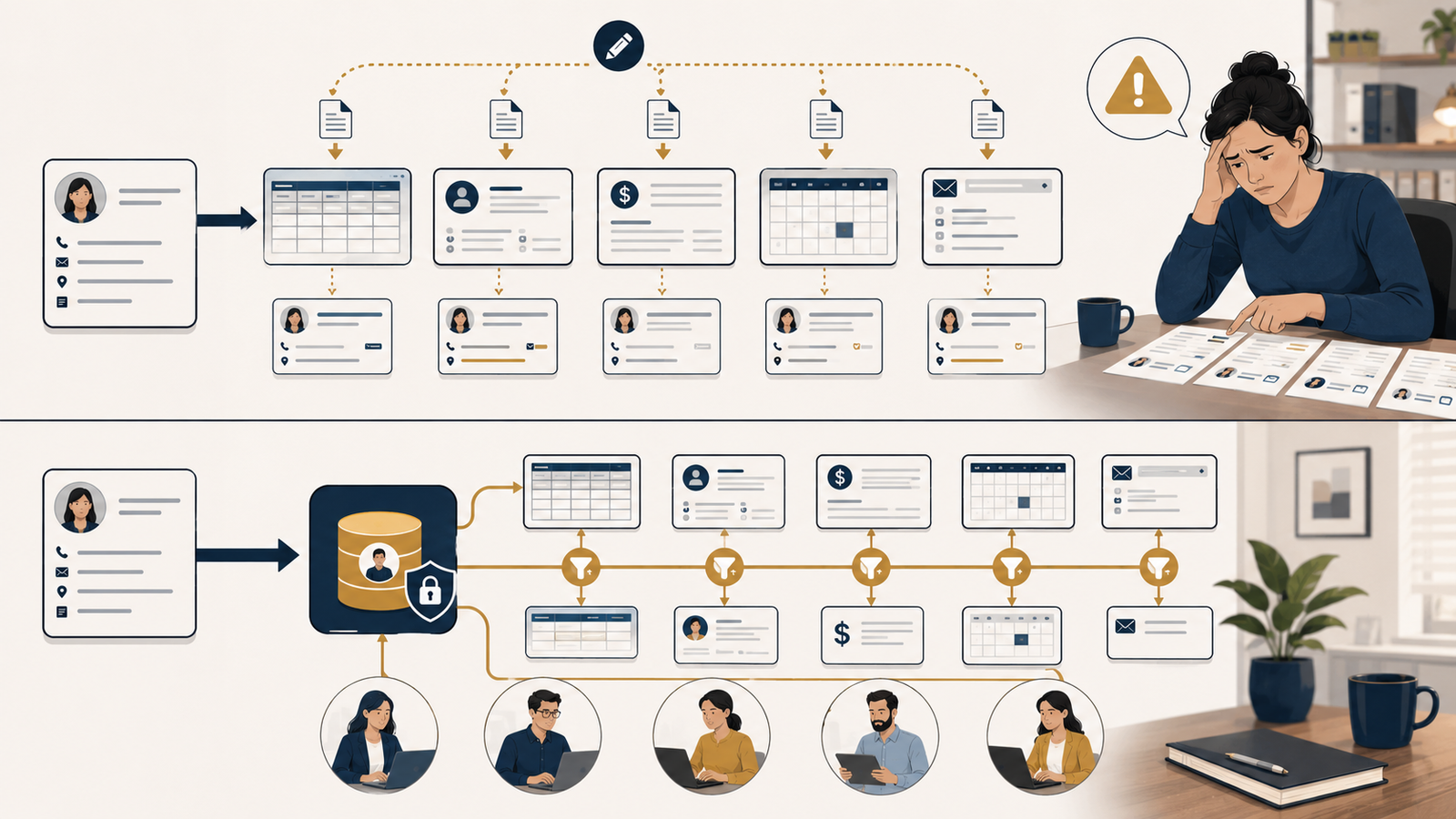
Why Are We Entering This Again?
A new customer completes a form. An employee copies the information into a spreadsheet. Someone else enters it into the customer management system. The accounting team types part of it again when creating the customer’s billing profile. A manager then uses the spreadsheet to prepare a weekly report.
The business has collected the information once—but handled it four or five times.
This may appear to be a minor administrative inconvenience. Each step takes only a few minutes, and the work still gets done. But repeated data entry creates more than wasted effort.
It creates multiple versions of the same record, each capable of becoming incomplete, outdated, or wrong.
The question is no longer simply, “How much time are we spending entering this?”
It is, “Which version does the business trust when they disagree?”
Duplicate entry is often a symptom
Employees rarely re-enter information because they enjoy repetitive work. They do it because the tools and processes around them do not share what the next person needs.
Repeated entry may reveal that:
- Two systems cannot exchange information
- Different teams collect the same information for different purposes
- Employees cannot access the record they need
- The official system is difficult to use or does not support the actual workflow
- A spreadsheet has become the unofficial bridge between applications
- Reports require information to be rearranged manually
- Nobody has defined which system owns the authoritative record
This matters because replacing the typing with automation may not solve the underlying problem. If the business does not understand why the copies exist, automation can distribute bad or incomplete information faster.
Before asking how to move data automatically, determine why it needs to move at all.
Every copy creates another version of the truth
Suppose a customer updates their mailing address. The change is made in the billing system but not in the customer spreadsheet or service platform.
Which address is correct?
The answer may depend on whom you ask. Accounting trusts the billing system. The service team trusts its application. A manager trusts the spreadsheet used for weekly reporting. Each record was accurate at some point, but the business no longer has one dependable source.
That uncertainty produces real operational consequences:
- Employees spend time comparing records and asking customers to repeat information
- Orders, invoices, or notices are sent to the wrong address
- Reports contain different totals depending on the source used
- Customer commitments are missed because updates do not reach every team
- Decisions are made using incomplete or outdated information
- Corrections must be repeated across several systems
Duplicate data does not merely increase the number of records. It increases the number of relationships the business must keep synchronized.
Two copies create one potential mismatch. Five copies create a maintenance problem.
The hidden cost is larger than the typing
When businesses estimate the cost of repeated entry, they often count only the minutes spent copying information. That understates the problem.
The full cost can include:
Verification
Employees stop to compare screens, emails, and spreadsheets because they are unsure which record is current.
Correction
A simple typo must be found, investigated, corrected, and sometimes explained to a customer or vendor.
Reconciliation
Teams devote time to making reports agree when the underlying systems contain different information.
Interruption
Employees contact one another to confirm details that should already be available and reliable.
Delay
Work waits because the information required for the next step has not been transferred or verified.
Lost confidence
Once employees stop trusting the primary system, they create personal notes and side spreadsheets. Those workarounds introduce even more copies.
The original data-entry task may take three minutes. The uncertainty created by inconsistent records can follow the business for months.
Duplicate records can also create risk
The more places information exists, the more places the business must protect, update, retain, and eventually delete it.
A customer list exported into a spreadsheet may lack the access controls, backups, activity records, or retention rules applied to the primary system. Employee or financial information may be copied into email, shared drives, downloads folders, or personal notes simply because another system requires manual entry.
Each copy expands the number of people, devices, applications, and storage locations that may expose the information.
Duplicate records can therefore create:
- Privacy and confidentiality concerns
- Inconsistent access permissions
- Unclear retention and deletion practices
- Greater impact if an account or device is compromised
- Difficulty responding when a customer asks for information to be corrected or removed
- Records that remain accessible after they are no longer operationally necessary
This does not mean every duplicate is inappropriate. Backups, archives, and controlled reporting datasets serve legitimate purposes. The risk comes from unmanaged copies created without clear ownership, protection, or a defined reason to exist.
A familiar small-business example
Imagine a home-services company that receives appointment requests through its website.
An office employee copies the customer’s name, address, phone number, service request, and preferred date into a scheduling calendar. A technician receives part of the information by text message. After the visit, the office enters the customer into accounting software to create an invoice. A separate spreadsheet tracks follow-up opportunities.
One request has now become several records.
If the customer changes the appointment time, the calendar may be updated but the technician’s message is not. If the technician corrects the address, accounting may still use the original version. If the service is cancelled, the follow-up spreadsheet may continue treating the customer as an active lead.
No employee intended to create bad information. Each person completed their part using the tool available to them. The errors emerged in the spaces between those tools.
The first improvement is not necessarily purchasing an all-in-one platform. It is mapping where the information enters, where it is copied, who uses each version, and where changes stop traveling.
Decide which record is authoritative
For every important category of information, the business should be able to answer one question:
Where is the official record?
The authoritative source may differ by type of information. The accounting system may own invoice status, while the customer management system owns contact and sales activity. The scheduling platform may own appointment time, while a service-management system owns completion details.
What matters is that employees know:
- Where the original information should be entered
- Which system is allowed to change it
- Which other tools receive copies
- How updates reach those tools
- Who resolves a conflict when records disagree
- How long secondary copies should remain
Without those decisions, “the system of record” is simply whichever screen an employee happens to trust.
Trace one piece of information through the business
You do not need a complex technology review to begin finding duplicate data.
Choose one common piece of information—such as a customer address, employee start date, product price, purchase order number, or service status—and follow it from the moment it enters the business.
Ask:
- Where is this information first collected?
- Who enters, copies, exports, or reformats it?
- Which systems, spreadsheets, emails, or documents receive it?
- Why does each copy exist?
- Which version is considered authoritative?
- What happens when the information changes?
- Where are errors usually discovered?
- Which copies contain sensitive information or broader access than necessary?
Observe the work if possible. A written procedure may say information moves directly from one system to another while an employee actually relies on an exported spreadsheet, copied email, or handwritten note to bridge the gap.
Improve the process before integrating the tools
Once the duplicate entry points are visible, resist the urge to connect everything immediately.
Use the smallest sustainable improvement first.
Stop collecting information nobody uses
Every unnecessary field consumes time and creates another item to maintain. If nobody can explain why a piece of information is required, consider removing it.
Collect information once, as close to the source as possible
Whenever practical, allow the customer, employee, or original system to provide the information directly to the authoritative record. Correcting information at the source is usually easier than reconciling several copies later.
Give the right employees appropriate access
Sometimes duplicate entry exists because a team cannot view or update the primary record. Adjusting roles and permissions may solve the problem without adding software, provided access remains limited to what each person needs.
Standardize names, formats, and required fields
Integrations cannot reliably match “Robert Smith,” “Bob Smith,” and “R. Smith” if the business has no consistent identifier or format. Clean definitions make both manual and automated work more reliable.
Replace approval with validation where appropriate
A system can check whether required information is present or formatted correctly without making the entire record wait for a manager. Reserve human review for exceptions and meaningful decisions.
Integrate or automate stable transfers
After the business has identified the authoritative record and simplified the flow, an integration may eliminate routine copying. Start with a limited, high-volume transfer; test changes and exceptions; monitor failures; and maintain a practical recovery process.
An automated transfer is not “set it and forget it.” Someone must own it, know what information moves, and be alerted when it stops working.
Do not confuse consolidation with improvement
Buying one large system may reduce the number of applications, but it can also create cost, complexity, and new workarounds if it does not fit how the business operates.
Likewise, synchronizing every field between every tool may create more dependency than value. Not every application needs a complete copy of every record. Each system should receive only the information required for its purpose.
The objective is not to force all data into one place. It is to create clear ownership and dependable movement so employees can find the right information without recreating it.
Enter once, use deliberately
Repeated data entry is easy to dismiss because it is familiar. Employees compensate for disconnected systems every day, and the business continues to operate.
But every unnecessary copy adds friction and risk. It consumes time, creates another opportunity for error, spreads sensitive information, and makes it harder to know which record reflects reality.
When the same information appears in several places, do not begin by asking which automation tool can connect them.
First ask:
- Why does each copy exist?
- Which record should be trusted?
- Who owns keeping it accurate?
- What is the simplest way to prevent the next mismatch?
The best process is not necessarily the one with the fewest systems. It is the one in which information is entered once, maintained intentionally, and available where it is genuinely needed.